— Enterprise Guide
Headless CMS Migration Costs: 2026 Industry Benchmarks
What Enterprise Teams Actually Spend on Digital Transformation
Quick Navigation
- Cost Ranges by Project Size - Small to Enterprise
- Where Your Budget Goes - Phase-by-phase allocation
- Hidden Costs That Blow Budgets - +30-50% you didn't plan for
- Timeline Benchmarks - How long this actually takes
- 3-Year TCO Analysis - Long-term cost comparison
- Budget Calculator Framework - Take this to your CFO
- Red Flags to Avoid - Warning signs of budget explosion
- Bottom Line & Next Steps
What Enterprise Teams Actually Spend on Digital Transformation
How much does a headless CMS migration actually cost? Ask three agencies, get three wildly different answers—ranging from $80,000 to $800,000 for what sounds like the same project. Ask your CFO for the budget, and the real number lands somewhere between "uncomfortable" and "terrifying."
The problem? Cost estimates vary 3-5x depending on who you ask. Hidden costs blow budgets by 30-50%. There are no industry benchmarks, so you're shooting in the dark. CFOs demand data, but agencies provide vague "it depends" answers that offer no clarity.
Here's the truth: After completing 25+ CMS migration projects over the past five years, we've seen the patterns. The costs are actually quite predictable once you understand the variables. The companies that get burned are the ones who don't account for the hidden costs—and trust me, there are many.
In this guide, you'll get:
- Real cost ranges by project size (small to enterprise)
- Complete breakdown of where your money actually goes
- The hidden costs that derail budgets (and how to avoid them)
- Timeline benchmarks that tie directly to costs
- 3-year TCO comparison: headless vs. traditional vs. doing nothing
- A budget framework you can actually take to your CFO
Full transparency: This analysis is based on 25+ CMS migration projects completed by Dotfusion between 2020-2025, combined with publicly available industry data from agency benchmarking reports and client case studies. All client data is anonymized. We're showing you the real numbers because the industry needs honest benchmarks.
Let's dive in.
What Does a Headless CMS Migration Actually Cost?
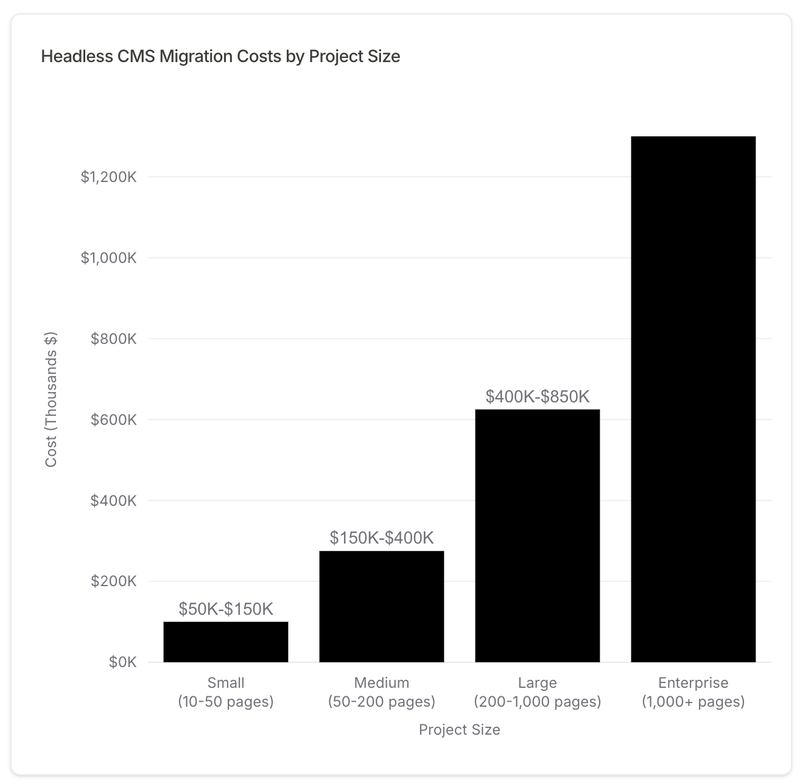
The short answer: It depends on project size. But not in the vague way agencies usually say it. Here are the actual ranges.
The Framework
| Project Size | Pages | Content Items | Complexity | Cost Range | Timeline |
|---|---|---|---|---|---|
| Small | 10-50 | 500-2,000 | Basic integrations, single brand | $50,000-$150,000 | 8-12 weeks |
| Medium | 50-200 | 2,000-10,000 | Multiple integrations, basic customization | $150,000-$400,000 | 12-20 weeks |
| Large | 200-1,000 | 10,000-50,000 | Complex integrations, multi-brand | $400,000-$850,000 | 20-32 weeks |
| Enterprise | 1,000+ | 50,000+ | Full digital ecosystem, global deployment | $850,000-$2,000,000+ | 32-52 weeks |
Now let's break down what you actually get at each level.
Small Projects: $50,000-$150,000
Typical profile: Small-to-mid business, single website, straightforward functionality.
What you get:
- Modern headless CMS (Agility, Contentful, Storyblok, or similar)
- Responsive design with mobile optimization
- Basic integrations (Google Analytics, contact forms, maybe HubSpot)
- Content migration from existing platform
- Basic training and documentation
What you DON'T get:
- Custom functionality or complex features
- Extensive content migration automation (expect some manual work)
- Complex workflows or approval systems
- Dedicated project manager (often shared across projects)
Team size: 2-3 people (1-2 developers, 1 designer, 0.5 PM)
Timeline: 8-12 weeks from kickoff to launch
Example scenario: A local real estate company with 30 property listings, migrating from WordPress to a headless CMS for better performance and mobile experience. Simple property search, contact forms, basic SEO optimization.
When this makes sense: You're a growing company that needs a modern platform but doesn't have complex requirements. Your current site is holding you back, but you don't need enterprise features.
Medium Projects: $150,000-$400,000
Typical profile: Mid-market company, 50-200 pages, multiple integrations, some custom requirements.
What you get:
- Enterprise-grade headless CMS implementation
- Custom design system with reusable components
- CRM integration (HubSpot, Salesforce, or similar)
- Analytics and tracking setup
- Search functionality (Algolia or similar)
- Automated content migration scripts
- Comprehensive training for editors and admins
- Post-launch support (typically 30-60 days)
What you DON'T get:
- Heavy customization or complex application features
- Extensive marketing automation beyond CRM
- Multi-site or multi-brand deployment
Team size: 3-5 people (2 developers, 1 designer, 0.5 PM, 0.5 architect)
Timeline: 12-20 weeks from kickoff to launch
Example scenario: A regional property management firm with 150 properties needs a modern platform with advanced property search, lead capture forms, CRM integration for automatic lead routing, and the ability for their marketing team to publish updates without developer help.
When this makes sense: You're a mid-market company with legitimate complexity—multiple systems that need to talk to each other, internal team that needs autonomy, and growth plans that require a scalable platform.
Large Projects: $400,000-$850,000
Typical profile: Enterprise company, complex requirements, significant integrations, possibly multi-brand.
What you get:
- Enterprise headless CMS with advanced features
- Sophisticated design system and component library
- Multiple complex integrations (CRM, ERP, PMS, marketing automation)
- Custom functionality tailored to your business processes
- Fully automated content migration with QA processes
- Advanced search and filtering capabilities
- User roles and permissions for complex organizations
- Comprehensive training program for multiple teams
- Dedicated project manager and technical architect
- Extended post-launch support (90+ days)
What you DON'T get:
- Global multi-region deployment (different sites per country)
- Extensive custom applications that go beyond content management
Team size: 5-8 people (3-4 developers, 1-2 designers, 1 PM, 1 architect)
Timeline: 20-32 weeks (5-8 months)
Example scenario: A national commercial real estate company like Oxford Properties with 500+ properties across multiple asset classes (office, retail, industrial), requiring sophisticated search, property comparison tools, stakeholder approval workflows, and integration with their property management system and CRM.
When this makes sense: You're an established enterprise with complex needs, multiple stakeholders, integration requirements, and the budget to do it right. Your digital platform is a competitive advantage, not just a cost center.
Enterprise Projects: $850,000-$2,000,000+
Typical profile: Global enterprise, 1,000+ pages, full digital ecosystem transformation, multi-brand, multi-region.
What you get:
- Everything from the Large tier, plus:
- Multi-brand/multi-site architecture
- Global deployment with regional customization
- Extensive custom applications and workflows
- Integration with 10+ enterprise systems
- Advanced personalization and targeting
- Comprehensive change management program
- Dedicated team (not shared resources)
- Extended timeline with phased rollouts
- White-glove support and strategic consultation
Team size: 8-12+ people (4-6 developers, 2 designers, 1-2 PMs, 1 architect, various specialists)
Timeline: 32-52 weeks (6-12 months)
Example scenario: An international REIT with properties in 15 countries, multiple brands (office, retail, hospitality), regional websites with localized content, complex approval workflows spanning multiple departments, and integration with global ERP, CRM, PMS, and financial systems.
When this makes sense: Your digital platform is mission-critical infrastructure. You're transforming not just your website but your entire digital ecosystem. You have the budget, the stakeholder buy-in, and the commitment to do enterprise-grade work.
Where Does Your Budget Actually Go?
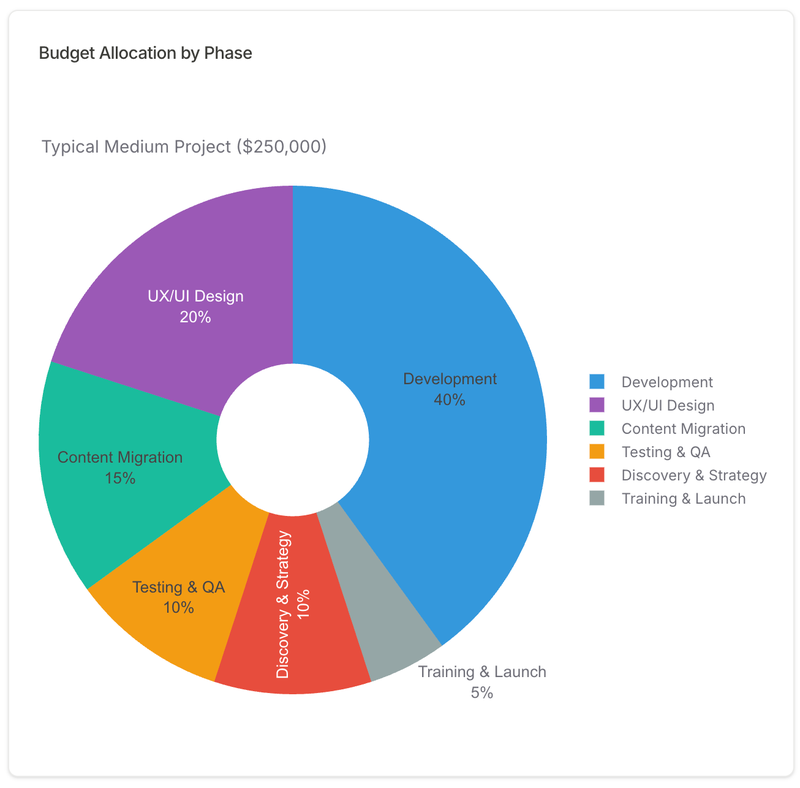
Let's get specific. Here's how a typical $250,000 medium project breaks down by phase.
Phase-by-Phase Budget Allocation
| Phase | % of Budget | Cost | Hours | Timeline | Key Deliverables |
|---|---|---|---|---|---|
| Discovery & Strategy | 10% | $25,000 | 100 hrs | Weeks 1-3 | Content audit, technical assessment, platform selection, project roadmap, stakeholder interviews |
| UX/UI Design | 20% | $50,000 | 200 hrs | Weeks 4-8 | Wireframes, component library, design system, high-fidelity mockups, interactive prototypes |
| Development | 40% | $100,000 | 400 hrs | Weeks 9-16 | CMS configuration, frontend build, backend integrations, custom functionality, API development |
| Content Migration | 15% | $37,500 | 150 hrs | Weeks 14-18 | Migration scripts, content cleanup, metadata mapping, SEO preservation, QA validation |
| Testing & QA | 10% | $25,000 | 100 hrs | Weeks 17-19 | Functional testing, performance testing, security audit, accessibility testing, user acceptance testing |
| Training & Launch | 5% | $12,500 | 50 hrs | Weeks 19-20 | Editor training, admin documentation, phased rollout, go-live support, post-launch monitoring |
| TOTAL | 100% | $250,000 | 1,000 hrs | 20 weeks | Live, optimized headless CMS platform |
Why This Breakdown Matters
Development is 40%, not 60%: Many teams think development will eat most of the budget. In reality, design and content migration take significant time—and underestimating them leads to rushed work or scope cuts.
Discovery is 10%, not 5%: Cutting discovery to save money is like skipping the blueprint to save on architect fees. You'll pay 2-3x more to fix problems that discovery would have prevented.
Content migration is 15%: This is often the most underestimated phase. If your content is messy (it is), plan for 20-25% of the budget here. More on this in the "Hidden Costs" section below.
Training is only 5%: But skipping it means your $250,000 platform sits unused while your team continues using the old system. Don't skimp here.
The Hourly Math Check
- Average blended rate: $250/hour
- Senior architects: $300/hr
- Developers: $200-250/hr
- Designers: $175-225/hr
- Project managers: $150-200/hr
- 1,000 hours = 5 people working full-time for 5 months
- Or: 3 people for 8 months
- Typical structure: 3-5 people for 12-20 weeks
This math helps you spot lowball bids. If an agency quotes $150,000 for a medium project, they're either:
- Using junior/offshore resources ($100-150/hr)
- Planning 600 hours instead of 1,000 (corners will be cut)
- Planning to upsell you later ("Oh, that feature? That's extra.")
The Hidden Costs That Blow Budgets
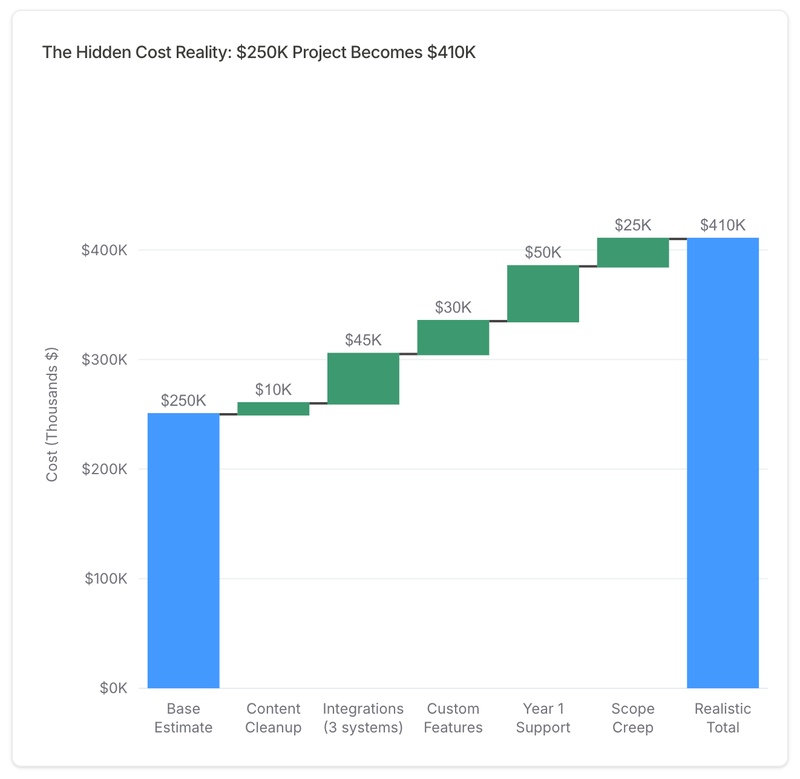
Here's where budgets go off the rails. These are the costs agencies don't always highlight upfront—but they're very real.
1. Content Cleanup: +20-30% of Migration Budget
The problem: Your content is messier than you think.
- Duplicate pages that serve no purpose
- Outdated content from 2018 that should have been archived
- Inconsistent formatting (some pages in Arial, some in Times New Roman?)
- Broken links to pages that no longer exist
- Missing alt text on images (goodbye, accessibility compliance)
- PDFs that should be web pages
- 47 different ways your team has formatted "contact us" buttons
The reality: Plan to clean, rewrite, or consolidate 30-40% of your content during migration. You can't just lift-and-shift garbage into a beautiful new system.
Cost impact: If content migration is budgeted at $37,500, content cleanup adds $7,500-$11,250.
How to reduce it: Do a ruthless content audit BEFORE the project starts. Archive anything you haven't updated in 2+ years. Consolidate duplicate pages. You'll thank yourself later.
2. Third-Party Integrations: $5,000-$50,000 Per Integration
The problem: "We need to integrate with [System X]" sounds simple. It never is.
Real costs by integration type:
- CRM (HubSpot, Salesforce): $10,000-$25,000
- Form data needs to flow to CRM
- Lead scoring and routing logic
- Contact data sync (bidirectional)
- Custom field mapping
- ERP (SAP, Oracle, NetSuite): $25,000-$75,000
- Often no documented API
- Requires middleware layer
- Data transformation complexity
- Testing is extensive
- Marketing Automation (Marketo, Pardot): $10,000-$20,000
- Email campaign integration
- Landing page sync
- Progressive profiling
- Property Management Systems: $15,000-$50,000
- Highly variable depending on system
- Property data sync
- Availability calendars
- Booking workflows
- Analytics & Personalization (Segment, Optimizely): $5,000-$15,000
- Event tracking setup
- User segmentation
- A/B testing configuration
The reality: Budget $15,000 per integration as a baseline. Complex or legacy systems can double that.
How to reduce it: Question whether you need real-time sync. Batch updates overnight are often sufficient and cost 50% less to implement.
3. Custom Functionality: $10,000-$100,000+ Per Feature
The problem: "Can we build a custom property search with AI-powered recommendations?" Sure. That'll be $75,000.
Real costs by feature type:
- Simple custom features: $10,000-$25,000
- Custom calculators (mortgage, ROI)
- Multi-step forms with conditional logic
- Custom filtering interfaces
- Complex features: $50,000-$100,000
- Advanced search with 10+ filters
- Recommendation engines
- Interactive maps with clustering
- Custom dashboards
- Very complex features: $100,000+
- Custom booking/transaction systems
- Tenant portals with authentication
- Document management systems
- Real-time collaboration tools
The reality: Every "Can we also..." in a project meeting adds weeks and $10,000+.
How to reduce it: Use out-of-the-box solutions wherever possible. Algolia for search ($99/month) beats building custom search for $60,000. Save custom development for what's truly unique to your business.
4. Ongoing Support & Maintenance (Year 1): 15-20% of Development Cost
The problem: Launch isn't the finish line. The platform needs ongoing care.
Year 1 post-launch costs:
- Bug fixes: 5-10 hours/month × $200/hr = $12,000-$24,000/year
- Edge cases that testing missed
- Browser compatibility issues
- Performance optimization
- Content support: 5-10 hours/month = $12,000-$24,000/year
- "How do I update this page?"
- New page templates
- Design adjustments
- Platform updates: Quarterly = $5,000-$10,000/year
- CMS version upgrades
- Security patches
- Dependency updates
- Hosting/CDN: $500-$2,000/month = $6,000-$24,000/year
- Cloud hosting (AWS, Azure, Vercel)
- CDN for global performance
- Database and storage
The reality: Plan for $40,000-$80,000 in Year 1 post-launch costs.
How to reduce it: Train your internal team thoroughly. Choose a platform with excellent documentation. Opt for managed hosting to reduce DevOps overhead.
5. Scope Creep: The Silent Budget Killer (+25% on average)
The problem: "While we're at it, can we also...?"
Scope creep starts innocently:
- "Can we add one more page template?" (seems small)
- "Can we build a careers portal?" (makes sense)
- "Can we add a blog while we're here?" (why not?)
Then compounds quickly:
- 10 small additions = 2-3 weeks = $20,000-$30,000 added cost
The reality: Projects without strict scope control run 25-40% over budget.
How to reduce it:
- Document scope in excruciating detail upfront
- Create a "Phase 2" list for post-launch features
- Require formal change requests with cost estimates
- Remind stakeholders: "Yes, we can do that—here's the timeline and cost impact"
The Hidden Cost Summary
For a $250,000 base project, expect these hidden costs:
- Content cleanup: +$10,000
- Integrations (3 systems): +$45,000
- Custom features (2): +$30,000
- Year 1 support: +$50,000
- Scope creep: +$25,000
Total Hidden Costs: $160,000 (64% of original budget)
Realistic total budget: $410,000 (not $250,000)
This isn't agencies trying to rip you off. This is the reality of complex enterprise software projects. The companies that budget realistically are the ones that succeed.
Timeline Benchmarks: How Long Does This Take?
Time is money. Literally. Here's what to expect.
Realistic Timelines by Project Size
| Project Size | Typical Timeline | Compressed Timeline | Extended Timeline |
|---|---|---|---|
| Small | 8-12 weeks | 6-8 weeks (risky) | 12-16 weeks (safe) |
| Medium | 12-20 weeks | 10-14 weeks (aggressive) | 20-26 weeks (thorough) |
| Large | 20-32 weeks | 16-24 weeks (very aggressive) | 32-40 weeks (conservative) |
| Enterprise | 32-52 weeks | 24-36 weeks (requires dedicated team) | 52-78 weeks (includes change management) |
Timeline Factors That Add Weeks
- Stakeholder complexity: Every additional decision-maker adds 1-2 weeks (death by committee)
- Content volume: 10,000+ content items? Add 4-6 weeks for migration
- Integration complexity: Each complex integration adds 2-4 weeks
- Custom functionality: Each major feature adds 2-6 weeks
- Security/compliance: Healthcare (HIPAA) or finance (SOC 2)? Add 3-4 weeks for audits
- Multi-region deployment: Each region adds 2-3 weeks (localization, legal, hosting)
The Cost-Time Relationship
Here's the uncomfortable truth: Faster ≠ Cheaper.
- Compressed timeline (30% faster): Requires +20-30% more budget
- Why? Larger team to run work in parallel
- Overtime and weekend work
- Premium for rushed timeline
- Example: 12-week medium project → 10 weeks = $250K → $300K
- Extended timeline (30% longer): Costs +10-15% more
- Why? Longer carrying costs (team salaries, overhead)
- More opportunity for scope creep
- Loss of momentum and context
- Example: 20-week medium project → 26 weeks = $250K → $275K
- Sweet spot: Industry-standard timelines = optimal cost efficiency
When to Compress the Timeline
✅ Good reasons:
- Market opportunity (major conference, seasonal launch)
- Competitive pressure (competitor just launched a killer site)
- Executive mandate with budget to back it up
❌ Bad reasons:
- Impatience
- Unrealistic expectations
- Budget constraints (rushing makes it MORE expensive, not less)
When to Extend the Timeline
✅ Good reasons:
- Complex stakeholder alignment (better to get it right)
- Limited internal resources (can't dedicate full-time team)
- High-risk launch (mission-critical, can't afford mistakes)
- Change management needs (large organization needs time to adapt)
❌ Bad reasons:
- Lack of executive commitment
- No dedicated decision-maker
- Constantly changing requirements
Bottom line: A medium project (12-20 weeks) at standard pace is optimal. Compress or extend only with clear justification and budget adjustment.
3-Year Total Cost of Ownership (TCO)
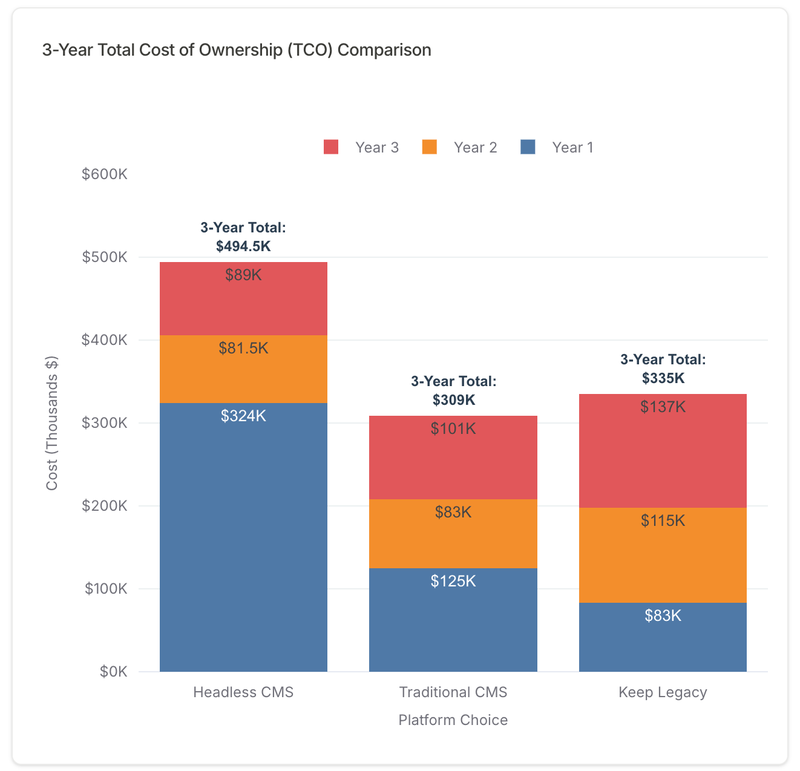
Let's settle the big question: What does this cost over time?
Scenario: Medium-sized commercial real estate company, 150 properties, needs a modern content platform.
The 3-Year Breakdown
| Cost Category | Headless CMS | Traditional CMS (WordPress) | Keep Legacy System |
|---|---|---|---|
| YEAR 1 | |||
| Migration/Implementation | $250,000 | $80,000 | $0 |
| Platform Licensing | $18,000 | $10,000 | $15,000 |
| Hosting/CDN | $6,000 | $5,000 | $8,000 |
| Support/Maintenance | $50,000 | $30,000 | $60,000 |
| Year 1 Total | $324,000 | $125,000 | $83,000 |
| YEAR 2 | |||
| Platform Licensing | $20,000 | $12,000 | $15,000 |
| Hosting/CDN | $6,500 | $6,000 | $10,000 |
| Support/Maintenance | $30,000 | $35,000 | $75,000 |
| Enhancements | $25,000 | $30,000 | $15,000 |
| Year 2 Total | $81,500 | $83,000 | $115,000 |
| YEAR 3 | |||
| Platform Licensing | $22,000 | $14,000 | $15,000 |
| Hosting/CDN | $7,000 | $7,000 | $12,000 |
| Support/Maintenance | $30,000 | $40,000 | $90,000 |
| Enhancements | $30,000 | $40,000 | $20,000 |
| Year 3 Total | $89,000 | $101,000 | $137,000 |
| 3-YEAR TCO | |||
| TOTAL | $494,500 | $309,000 | $335,000 |
The TCO Analysis
Headless CMS:
- ❌ Highest Year 1 cost (big upfront investment)
- ✅ Most efficient Year 2-3 (lower maintenance, better performance)
- ✅ Best long-term ROI (faster content velocity, better conversions, competitive advantage)
Traditional CMS (WordPress/Drupal):
- ✅ Lower upfront cost (familiar technology, many agencies can build it)
- ⚠️ Rising maintenance costs (technical debt accumulates, plugins conflict, security patches)
- ❌ Limited flexibility (harder to integrate, customize, scale)
Keep Legacy System:
- ✅ Lowest Year 1 cost (no migration pain)
- ❌ Highest Year 2-3 cost (constant band-aids, firefighting, missed opportunities)
- ❌ Massive opportunity cost (losing deals to competitors with better digital experiences)
The Hidden Value of Headless CMS (Not in TCO Table)
These benefits don't show up in a cost spreadsheet, but they're real:
- Content velocity: Publish updates 5x faster (marketing can ship without waiting for dev)
- Lead generation: 30-50% increase from better UX, faster pages, mobile optimization
- SEO performance: 60% faster page loads = better Core Web Vitals = higher rankings
- Developer productivity: 40% faster to build new features (API-first architecture)
- Future-proof: When you want to launch a mobile app, voice interface, or digital signage, your content is ready (API-first means channel-agnostic)
Break-Even Analysis
Let's do some real math. If your headless CMS generates just 10 additional leads per month at $5,000 revenue per lead:
- Additional annual revenue: 10 × $5,000 × 12 = $600,000/year
- Year 1 investment: $324,000
- Break-even: Month 7
- 3-year ROI: ($600K × 3) - $494,500 = $1.3M net gain
And that's conservative. Most clients see 20-50 additional leads per month from a well-executed platform migration.
The TCO Verdict
- Year 1: Headless CMS costs 2.6x more than keeping your legacy system (expect this)
- Year 3: Legacy system costs 54% more annually than headless (and the gap widens)
- 5-year view: Headless CMS saves $200,000-$400,000 vs. keeping legacy
- Plus: Immeasurable value of competitive advantage, market agility, team morale, not constantly firefighting a broken system
The companies that win aren't the ones who spend the least. They're the ones who invest strategically and reap compounding returns.
How to Budget: The Framework
Enough theory. Here's how to actually calculate your budget.
Step 1: Size Your Project
- Pages: _____
- Content items (pages, blog posts, products): _____
- Integrations needed: _____ (CRM? ERP? PMS? Marketing automation?)
- Custom features: _____ (Advanced search? Custom forms? Interactive tools?)
- Timeline constraint: _____ (Do you have a hard deadline?)
Step 2: Find Your Base Budget
Match your project to the ranges above:
- Small (10-50 pages): $50,000-$150,000
- Medium (50-200 pages): $150,000-$400,000
- Large (200-1,000 pages): $400,000-$850,000
- Enterprise (1,000+ pages): $850,000-$2,000,000+
Let's say you have 150 pages, so you're in the Medium range: $250,000 base budget.
Step 3: Add Complexity Multipliers
| Complexity Factor | Budget Impact |
|---|---|
| Each integration beyond 2 basic ones | +$15,000 |
| Each custom feature (search, calculators, dashboards) | +$10,000-$50,000 |
| Multi-brand or multi-site architecture | +20-30% |
| Security/compliance requirements (HIPAA, SOC 2) | +10-15% |
| Global deployment (multiple regions/languages) | +25-40% |
Example:
- Base: $250,000
- 3 integrations (CRM, property management system, analytics): +$45,000
- 2 custom features (advanced property search + lead scoring): +$30,000
Step 4: Add Hidden Costs
| Hidden Cost | Amount |
|---|---|
| Content cleanup (if your content is messy—it is) | +20% of migration phase budget |
| Scope creep buffer (trust me, you'll need it) | +15% of total budget |
| Year 1 support and maintenance | +15-20% of development cost |
Example:
- Base + complexity: $325,000
- Content cleanup: +$10,000
- Scope creep buffer: +$50,000
- Total Year 1 Project Cost: $385,000
- Year 1 support: +$50,000
- Total Year 1 Investment: $435,000
Step 5: Calculate Total Realistic Budget
For our medium CRE project example:
- Base budget: $250,000
- Integrations (3): +$45,000
- Custom features (2): +$30,000
- Content cleanup: +$10,000
- Scope creep buffer: +$50,000
- Total Project Cost: $385,000
- Year 1 support: +$50,000
- Total Year 1 Investment: $435,000
That's your real number. Not $250,000. Not $150,000 because you found a cheap agency. $435,000 for Year 1.
Step 6: Build the Business Case for Your CFO
Now calculate ROI to justify the investment:
Cost: $435,000 (Year 1)
Benefits (be conservative):
- Current website generates: 50 leads/month
- Expected improvement: +20% (10 more leads/month)
- Value per lead: $5,000 (average deal size)
- Close rate: 20% (conservative for B2B)
ROI Calculation:
- Additional leads: 10/month × 12 = 120/year
- Additional deals: 120 × 20% close rate = 24 deals
- Additional revenue: 24 × $5,000 = $120,000/year
- Break-even: 3.6 years
Wait, that's not great ROI.
Let's be more realistic:
- Actual lead improvement from better UX: +40% (20 more leads/month)
- Higher-value leads from better targeting: $7,500 average
- Improved conversion from better nurturing: 25% close rate
Revised ROI:
- Additional leads: 20/month × 12 = 240/year
- Additional deals: 240 × 25% = 60 deals
- Additional revenue: 60 × $7,500 = $450,000/year
- Break-even: 11 months
- 3-year value: ($450K × 3) - $494,500 = $856,500 net gain
That's how you sell it to your CFO.
The Budget Conversation Script
❌ Don't say: "We need a new website. It'll cost $250K and make us look more modern."
✅ Do say: "Our legacy platform costs us $83,000/year to maintain and generates 40% fewer leads than competitors with modern platforms. Based on 25 industry benchmarks, a $435K investment in a headless CMS will break even in 11 months through increased lead generation and pay back $856K over 3 years. Without it, we're losing 15-20 deals annually to competitors with better digital experiences."
Lead with ROI. Back it with data. Close with competitive risk.
Red Flags That Will Blow Your Budget
Watch for these warning signs that your project is headed for trouble.
🚩 Red Flag #1: "We'll figure out scope as we go"
Impact: +30-50% budget overrun (guaranteed)
Why it's deadly: No clear scope = no way to track what's "extra" = everything becomes a "small add" = death by 1,000 cuts.
Fix: Lock detailed scope before development starts. Create a "Phase 2" list for good ideas that don't fit the timeline or budget. Require formal change requests with cost and timeline impacts.
🚩 Red Flag #2: "Our content is clean and ready to migrate"
Reality check: It's not. Ever. We've never seen it.
Impact: +2-4 weeks, +$20,000-$40,000 in unplanned cleanup work
Why it happens: Content accumulated over 10 years. Multiple editors with different approaches. Legacy CMS limitations that forced workarounds. Nobody's maintained it properly because the platform was a nightmare to use.
Fix: Do a content audit during discovery (before signing contracts). Budget cleanup time. Archive ruthlessly—you don't need every press release from 2014.
🚩 Red Flag #3: "We need to integrate with [obscure legacy system with no API]"
Impact: +4-8 weeks, +$30,000-$60,000 per integration
Why it's deadly: No documented API means you're building custom middleware. Every edge case requires testing. Data formats are inconsistent. Nobody who built the original system still works there.
Fix: Verify API documentation exists before committing to the integration. If there's no API, consider manual exports or replacing the legacy system. Sometimes it's cheaper to replace than integrate.
🚩 Red Flag #4: "All our stakeholders need approval on everything"
Impact: +30% timeline (every decision takes 2 weeks), +20% budget (extended carrying costs)
Why it's deadly: Death by committee. Design review with 12 people means 12 conflicting opinions. Developers sit idle waiting for decisions. Momentum dies.
Fix: Designate a single decision-maker with authority. Limit review cycles to 2 per phase (initial review + revision). Set strict timelines for feedback (3 business days max).
🚩 Red Flag #5: "We're shopping for the lowest bid"
Impact: Initial savings of 20%, re-work costs of 200%
Reality: A $150K bid for a $300K project means:
- Junior/offshore team (you'll be teaching them)
- Half the hours needed (corners will be cut)
- Missing critical phases (no discovery, minimal testing)
- You'll pay another agency $300K to fix it
Fix: Evaluate agencies on capability, track record, and cultural fit—not just price. The cheapest bid is rarely the cheapest total cost. Pay for experience.
🚩 Red Flag #6: "We don't need discovery, just start building"
Impact: 50% chance of project failure (scope explosion, missed requirements, wrong platform choice)
Why it's deadly: You're building without a blueprint. You'll discover requirements mid-development. You'll realize you chose the wrong platform. You'll rebuild sections 2-3 times.
Fix: Never, ever skip discovery. It pays for itself 10x over. Discovery prevents expensive mistakes, aligns stakeholders, and creates a roadmap everyone can follow.
🚩 Red Flag #7: "We'll train our team after launch"
Impact: $250K platform sits unused while team continues old workflows
Why it happens: Training feels like a "nice to have" so it gets deprioritized. Then launch happens and nobody knows how to use the new system. Panic ensues.
Fix: Train before launch, during UAT phase. Your team should be comfortable publishing content in staging weeks before go-live. Budget 2-3 training sessions (initial + refresher + advanced).
The Bottom Line: What You Actually Need to Know
After thousands of words and way too many spreadsheets, here's what matters:
✅ Cost Ranges Are Predictable
Once you understand the variables:
- Small projects: $50,000-$150,000
- Medium projects: $150,000-$400,000
- Large projects: $400,000-$850,000
- Enterprise projects: $850,000-$2,000,000+
These aren't arbitrary. They're based on team size, timeline, and complexity.
✅ Hidden Costs Add 30-50% to Initial Estimates
Budget for:
- Content cleanup
- Integration complexity
- Custom features
- Year 1 support
- Scope creep
The companies that succeed budget realistically from day one.
✅ Timeline Matters
12-20 weeks for a medium project is optimal. Faster costs more (larger team, premium for rushed work). Slower costs more (carrying costs, scope creep).
✅ 3-Year TCO: Headless Wins Long-Term
Year 1 is expensive (2-3x more than status quo). Year 2-3 are efficient (lower maintenance, better performance). By Year 5, you've saved $200K-$400K vs. legacy systems—plus the competitive advantage is immeasurable.
✅ The Budget Framework Works
- Size your project (pages, content, integrations, features)
- Find your base budget range
- Add complexity multipliers
- Add hidden costs
- Calculate realistic total budget
- Build ROI business case for CFO
This gives you a defensible number backed by data.
The Real Question Isn't "How Much Does It Cost?"
It's: "What does it cost us to NOT do this?"
- Lost leads: Competitors with modern platforms convert 40-60% better
- Developer productivity: Your team wastes hours fighting technical debt
- Marketing agility: Publishing a simple update requires a developer and takes 3 days
- Customer experience: Your mobile bounce rate is 65% (industry average with modern CMS: 25%)
- Opportunity cost: You can't launch that mobile app because your content is trapped in a legacy CMS
Your Next Steps
- Size your project using the framework in this guide
- Calculate realistic budget (don't forget hidden costs—they're 30-50% of the total)
- Build ROI business case with leads, revenue, and competitive positioning
- Get CFO buy-in using data, not emotion
- Choose the right partner (experienced in your industry, proven track record, not just cheapest bid)
Most companies spend $250,000-$500,000 on a headless CMS migration.
The companies that win are the ones who see it as an investment, not an expense. They budget realistically. They plan thoroughly. They execute strategically. And they reap compounding returns for years.
Is your legacy platform costing you deals? Let's talk about what a modern headless CMS could do for your business.
About This Guide
Last updated: January 23, 2026 | Next update: April 2026
Based on: 25+ CMS migration projects completed by Dotfusion, 2020-2025
About the Author: Chris Bryce leads digital strategy at Dotfusion, a Toronto-based digital agency specializing in headless CMS implementations for commercial real estate and enterprise clients. With 25+ successful migrations under our belt, we've seen what works—and what doesn't. This guide shares the real numbers so you can budget confidently.
Questions or feedback? feedback@dotfusion.com