—
Why Enterprise UX Design Fails on Most Corporate Websites (And How Headless CMS Fixes It)
Most enterprise UX content is written about internal software. This piece is about something different: the public-facing corporate website, where enterprise relationships actually begin. Learn why architecture decisions made before a designer opens Figma determine whether your website works for users, editors, and AI engines alike.
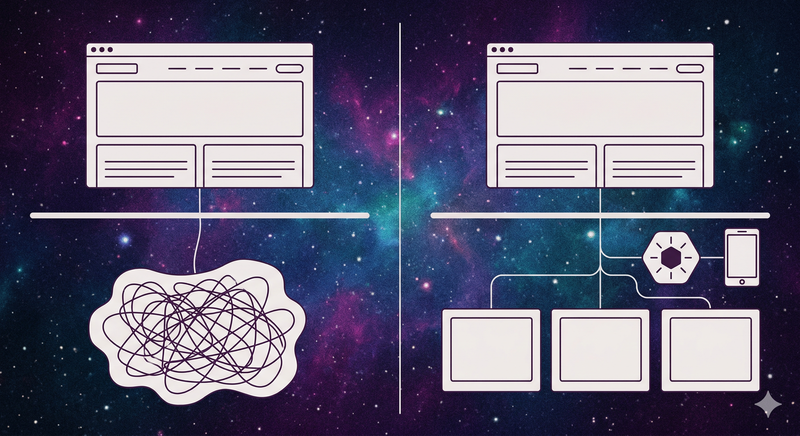
Most writing about enterprise UX design is aimed at the wrong problem.
Search for "enterprise UX design" and you'll find pages of advice about ERP dashboards, CRM workflows, and HRMS onboarding flows. Useful content, no question. But it entirely ignores the digital asset that your prospects, customers, partners, and investors interact with first: your website.
This isn't a piece about internal software. It's about enterprise website UX, and why getting it right is an architecture decision that happens long before any designer opens Figma.
📑 Table of Contents
- The Enterprise UX Problem Most Organizations Are Ignoring
- Why Architecture Is the Real UX Decision
- What Headless Architecture Does for Enterprise UX
- Five Principles of Enterprise Website UX That Actually Work
- The Discoverability Gap: When UX Fails AI Engines
- What This Looks Like in Practice
- The Content Velocity Problem
- Frequently Asked Questions
- The Architecture Decision Is the UX Decision
The Enterprise UX Problem Most Organizations Are Ignoring

Here's a stat worth sitting with: according to Bain & Company, 88% of business transformations fail to achieve their original ambitions. Digital projects are no exception.
The common explanation is scope creep, budget overruns, or change management failures. But in our experience across 25+ years of enterprise digital work, the real culprit shows up much earlier: organizations treat their enterprise website as a design problem when it's actually an architecture problem.
Your website is where enterprise relationships begin. It's where a procurement officer vets you before a meeting. Where a property tenant checks lease availability at 11 PM. Where a B2B buyer decides whether you look credible enough to take a call from. The quality of that experience, for each of those users, is determined less by the color palette and more by what's running underneath.
Two numbers from the WebAIM Million 2025 study, which analyzes the accessibility of the top 1,000,000 websites annually, make the structural problem clear:
- 94.8% of home pages have detectable WCAG 2 accessibility failures. Not edge cases. Measurable, documented failures.
- Home pages are 61% more complex than they were six years ago, growing from an average of 782 elements to 1,257.
More complexity. Fewer accessible experiences. That's the trajectory most enterprise websites are on, and it doesn't resolve with a redesign. It resolves with better architecture.
Why Architecture Is the Real UX Decision
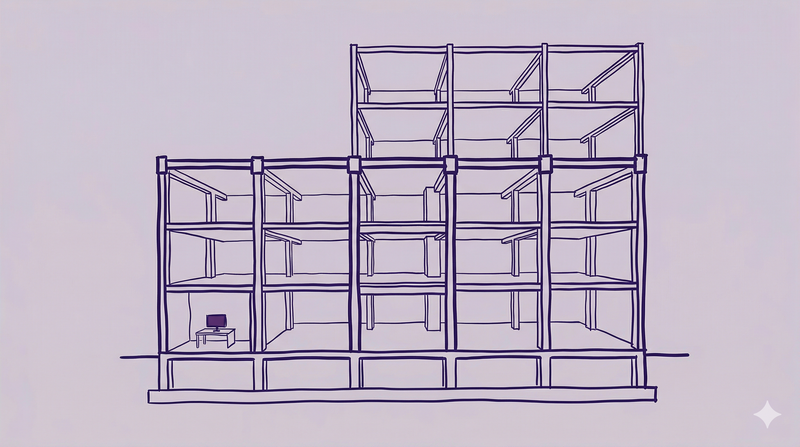
There's a persistent belief in enterprise organizations that UX is a design function. You hire designers, they make things look clean and intuitive, problem solved.
That's not how enterprise website UX works.
The decisions that determine your users' experience are made at the system level: what CMS platform you're on, whether your content is structured or free-form, how your frontend is built, whether your components are reusable or one-off. A designer can work brilliantly within a bad architecture, and users will still struggle.
McKinsey's research on the business value of design tracked 300 publicly listed companies across five years and found that top-quartile design performers saw 32% higher revenue growth and 56% higher total returns to shareholders than their industry counterparts. But the same study found that fewer than 5% of leaders can make objective design decisions, and more than half of companies have no objective way to assess the output of their design teams at all.
The problem isn't a lack of design investment. It's that design decisions are being made without the architectural foundation to support them.
The Freshworks "Cost of Complexity Report" (November 2025), a survey of 706 professionals across six countries, found that organizational and software complexity drains an average of 7% of annual revenue. At enterprise scale, that's not a rounding error. It's a strategic liability.
What Headless Architecture Does for Enterprise UX

A headless CMS separates content management from content presentation. Content lives in a structured repository and gets delivered through APIs to wherever it needs to appear: your website, a mobile app, a kiosk, a partner portal, a voice interface.
For enterprise UX, this separation matters for three reasons:
1. Editors and developers stop fighting over the same system. In a traditional monolithic CMS, every content update is a potential development event. Editors wait for dev cycles. Developers field urgent content requests. The experience suffers on both sides. In a headless architecture, editors work in a purpose-built publishing interface, developers build with the tools and frameworks they want, and neither group is blocked by the other.
2. Design systems become enforceable, not aspirational. Enterprise web design consistency breaks down when components are custom-coded page by page. A headless CMS with a component-based content model turns your design system into infrastructure. A structured "hero block" component with defined fields for headline, subheadline, image, and CTA renders consistently whether it appears on a product page, a regional landing page, or a campaign microsite. Governance becomes the default, not the exception.
3. You build once; you publish everywhere. Enterprise organizations are rarely single-channel. The same content that powers your website often needs to reach a mobile app, feed a partner API, or populate a digital display. Headless architecture supports all of those channels from one content source, without rebuilding the publishing workflow for each.
According to Storyblok's State of CMS 2025 report (noting that Storyblok is itself a headless CMS vendor), 69% of headless CMS users report improved time-to-market and productivity, and 57% cite enhanced personalization and user experience. For enterprise teams managing hundreds of pages across multiple markets, those numbers reflect a real operational shift.
Five Principles of Enterprise Website UX That Actually Work

These are not design best practices. They're architectural and strategic principles for decision-makers evaluating or rebuilding their enterprise digital presence.
1. Design for the editor, not just the end user. Enterprise UX fails when content editors can't publish without developer help. If your marketing team needs a ticket queue to update a page, your UX problem starts in the CMS, not the frontend. The editor experience is a UX problem, and it has direct consequences for content quality and velocity.
2. Treat discoverability as a UX outcome. In 2026, a website your users can't find is a website that doesn't work. Search engines and AI answer engines read structured content. An enterprise website built on unstructured, monolithic HTML is invisible to the systems your buyers use to find vendors. Structured content models in a headless CMS produce the clean, machine-readable output that search and AI engines reward. Read more: Answer Engine Optimization: The Next Frontier in Digital Strategy.
3. Make design systems governance, not style guides. A PDF style guide is a document. An enterprise design system built into a headless CMS is infrastructure. When components are structured and reusable, brand consistency is a technical constraint, not a voluntary standard. For organizations managing multi-brand, multi-region, or multilingual digital properties, this distinction is the difference between coherence and chaos.
4. Build accessibility into the architecture, not the QA process. The WebAIM Million 2025 data shows that pages built on modern JavaScript frameworks like Next.js average 38.6 accessibility errors, compared to a 51-error average across all pages. Framework choice matters. Accessibility audited at launch but not built into the component library is accessibility that degrades as the site grows. See how Dotfusion approaches this: Human-Centered UX in a Composable World.
5. Measure content velocity as a UX metric. The best UX on an empty website wins nothing. If your architecture makes content production slow, expensive, or dependent on developers, your users will experience an outdated site. Enterprise website UX includes how quickly your team can produce, publish, and update content at scale. This is where agentic content operations becomes relevant: it's not a separate initiative, it's the operational layer that keeps a well-designed site performing over time. See: Content Operations for Enterprise: A Complete Guide.
The Discoverability Gap: When UX Fails AI Engines

Here's a shift most enterprise organizations haven't fully processed: your website's users now include AI answer engines.
When a prospect asks ChatGPT, Perplexity, or Google's AI Overviews for a recommendation in your category, those systems go looking for structured, authoritative content. If your website content is buried in monolithic CMS templates, unstructured HTML, or behind JavaScript rendering that crawlers can't read, you don't appear.
This is a UX problem with a structural solution.
Related: Making Commercial Properties Discoverable in Answer Engine Optimization
Headless CMS platforms built with structured content models produce clean, semantic output that AI engines can parse. Add proper schema markup, an llms.txt file, and answer-ready content formats, and your enterprise website becomes visible in the places your buyers are increasingly searching. Ignore it, and you're designing a beautiful experience that your buyers' first-choice research tool can't see.
The community conversation around enterprise UX has been slow to pick up on this. The debates on Reddit's r/UXDesign and LinkedIn practitioner forums are still focused on internal software usability, stakeholder buy-in, and design maturity. Those are real problems. But for public-facing enterprise websites, the next frontier in UX is discoverability, and it's decided at the architecture level.
What This Looks Like in Practice

Two examples from Dotfusion's enterprise client work make the architecture-first approach concrete.
Oxford Properties manages one of the largest commercial real estate portfolios in North America. Their digital challenge wasn't a design problem: it was an architecture problem. Hundreds of property pages needed to stay current with live data feeds, bilingual publishing requirements, and consistent brand standards across an enormous portfolio. Dotfusion built their platform on Agility CMS with Bynder DAM integration, Elastic Search, and API-driven property pages. Editors publish across hundreds of properties. The design system is enforced at the component level. AI engines can read and index the structured property data.
Mitsubishi Electric faced a different version of the same challenge: a complex product catalog with technical documentation, multi-language requirements, and ERP integration needs. The architecture that solves that challenge creates better UX by design: structured product content, consistent templates, and API-driven data feeds that keep catalog information accurate without manual updates.
In both cases, the UX decisions that mattered most were made in the architecture phase, not the design phase.
The Content Velocity Problem

Building a great enterprise website is the beginning, not the end.
A well-architected, well-designed enterprise web presence needs content to perform. Search and AI engines reward fresh, structured, authoritative content. Your buyers expect to find current case studies, updated product information, and recent thought leadership. Keeping that content pipeline full on a traditional publishing model is expensive and slow.
According to Storyblok's State of CMS 2025 report, 44% of CMS users say their platform lacks built-in AI content tools. Separately, 49% of WordPress users say a single publishing workflow takes over an hour. At enterprise scale, that's a structural bottleneck.
Agentic content operations (the use of AI-powered workflows to research, draft, structure, and publish content at scale) is the operational layer that makes great enterprise website UX sustainable over time. It's not a replacement for editorial judgment. It's a multiplier for editorial capacity, extending what your team can produce without proportionally increasing headcount or cost.
Frequently Asked Questions
Can your editors publish content without a developer involved?
If the answer is "sometimes" or "it depends," that's a structural UX failure. In a properly architected headless CMS, editors work in a purpose-built publishing interface, fully independent of the development workflow. If every content update requires a developer, the architecture needs to change, not the editor.
Is your design system enforced at the component level, or does it live in a style guide?
If your design system is a PDF, it's aspirational, not operational. An enterprise design system built into a headless CMS as a structured component library is infrastructure: brand consistency becomes a technical constraint enforced at every publish, not a voluntary standard that degrades over time.
Can your content be read and indexed by AI answer engines?
Structured content, semantic HTML, and schema markup are table stakes for enterprise websites in 2026. If your content is locked inside monolithic CMS templates or rendered via JavaScript that crawlers can't parse, AI answer engines like ChatGPT and Perplexity can't find it. A headless CMS with structured content models produces clean, machine-readable output by default.
How many channels does your current CMS support from a single content source?
If the answer is one, you're rebuilding the publishing workflow for every new channel: website, mobile app, partner portal, digital display. Headless architecture delivers content through APIs to all of those channels from one content repository, without duplicating effort or introducing inconsistency.
How long does it take to publish a new page?
If the answer is measured in days and involves a developer, your content velocity is a UX problem. According to Storyblok's State of CMS 2025, 49% of WordPress users say a single publishing workflow takes over an hour. At enterprise scale, slow publishing means outdated content, which means a worse user experience and lower performance in search and AI discovery.
The Architecture Decision Is the UX Decision
Enterprise UX design for websites doesn't start with wireframes. It starts with the decision to build on infrastructure that can support the experience you need to deliver, at the scale you need to deliver it, across the channels your users and AI engines actually use.
Dotfusion has spent 25+ years building enterprise digital platforms. We've seen what happens when design and architecture get decoupled: beautiful sites that editors can't maintain, consistent branding that breaks at the third market, and well-researched UX that AI engines can't find.
The path forward combines headless CMS architecture, a properly governed design system, and an operational layer that keeps content moving. That's what enterprise website UX looks like when it works.
If you're evaluating your current platform or planning a migration, talk to Dotfusion about your enterprise website. We'll start with the architecture.
Dotfusion is a certified B Corporation and full-service digital agency specializing in headless CMS development, AI-driven content operations, and digital transformation for enterprise organizations. Official partners: Contentful, Storyblok, Agility CMS.